FAQ's
*Important Note*
The information on this page is intended to answer your important questions regarding YouMatrix product technical information such as number of discs needed for each device application and placement of discs on selected devices. If you don’t see the answer to your question here, please Contact Us for further clarification.
Smartphone Adapter
YouMatrix 5G
Learn how our flagship EMF adapter helps harmonize the intense frequencies emitted from all smartphones, keeping your energy balanced in a hyper-connected world.
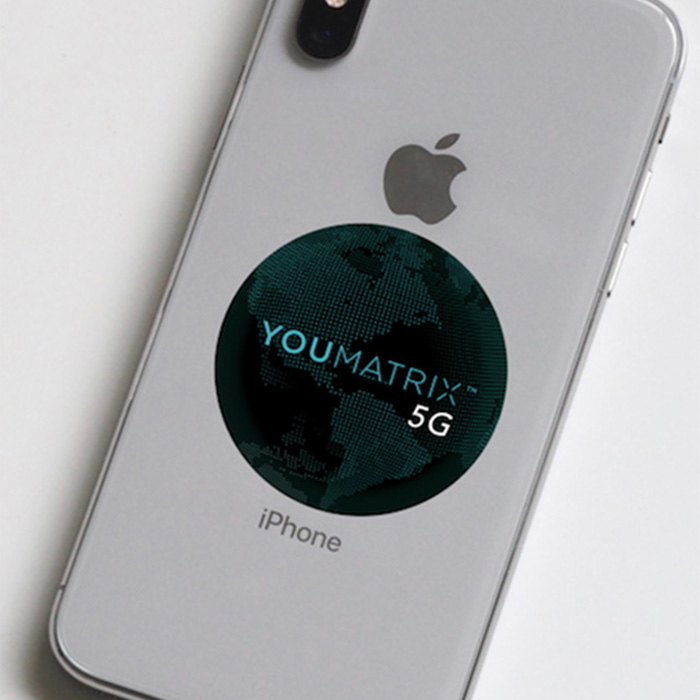
For clarification RFIDs are EMFs and hence the case is blocking EMFs. Any time you attempt to block or shield yourself from EMFs your phone has to ‘step up’ its power to try to find you the best signal, hence you are exposed to even more cellphone radiation. The YouMatrix 5G will definitely work with a case, however with an increase in cellphone radiation it may make the YouMatrix 5G work harder to keep up with the demand and may expire quicker. With that said, there is no way to determine how quickly or how much the case can put a strain on the 5G. That would be equivalent to trying to count the drops in a rainstorm.
Again for clarity, all the YouMatrix products are working to allow you access to the natural frequencies you require to be self-healing, not blocking or shielding you from EMFs.
All the Adapters are guaranteed for 12 months so it is suggested that you replace them at the year mark, however many people have enjoyed the benefits of having the same Adapter on their phone for more than a year. There is not an easy way to measure if your Adapter is still properly transforming the cellphone frequencies into biocompatible ones, however we are conducting biological tests to help you better determine that.
Your Tilys Biotech Adapter did not stop working (unless it is damaged) because a new version was released. It still utilizes the harmful cellphone frequencies as a catalyse allowing your body to access the vital information it needs in order to be self-healing. However since technology is evolving, so must the solutions and that is why we wanted to provide people with a 5G solution before the network was fully rolled out nationwide and globally. The 5G network will have many more frequencies and thus the 5G version of our product will be able to address those added toxins. In addition, many of the newest editions of cellphones are 5G compatible, thus even if you are not in an area where 5G is accessible you are still “picking them up” in the background because 5G is operated via a satellite network around the world. In fact, we are all being bombarded by these signals indirectly even without a phone at all, thus having a YouMatrix 5G on your cellphone can help transform these secondhand frequencies into beneficial information.
Absolutely, it will cover all previous cellphone network protocols, including 3G, 4G, and 4G LTE. 5G (5th Generation cellphone network protocol) has a greater bandwidth than previous generations and thus the YouMatrix 5G solution which covers this expanded bandwidth encompasses all previous generations.
After placing a You Matrix cellphone adapter on your phone, you become more resilient to destructive electromagnetic radiation in your vicinity.
The following will hamper the effectiveness of a YouMatrix cellphone adapter:
- if it is cut; a chunk is taken out;
- if it is burnt (physically or chemically),
- if the color and logo are rubbed away, severe sun damage, damage during removal, or
- if it is severely scratched to a point where you can see the backing.
We suggest that you put your YouMatrix cellphone adapter under a case.
However, we did accidently run a YouMatrix cellphone adapter through the washing machine. It came out a bit crumpled, but still effective! That said, we would advise against putting it in the washing machine, submerging it in liquid, or putting hot beverages on top of it, and we cannot be held responsible for damages in any of these cases. Please refer to our Warranty Policy for full details.
Although we have found we can carefully remove the YouMatrix cellphone adapter without any chemical adhesive removers and retain its effectiveness, we cannot guarantee it will not be damaged in the process. We do not take responsibility for damages if you choose to remove it.
Although a YouMatrix cellphone adapter has a strong adhesive backing, we have found it can be peeled off without having to use any acetone or glue removal products that may damage the phone. There may be some adhesive residue on the backside of the phone.
Please refer to the “Damages Policy” for your cell phone for the details regarding your device. We do not take any responsibility for damage to your phone or mobile device.
First, make sure you have wiped the back of your phone clean to insure oils are not preventing the adhesive from adhering.
Second, the adhesive has been designed to strengthen its bond over the first 24 hours of application (times may vary depending on environment). This allows you to adjust it in case it is not on straight or you decide to put it on the outside of your case because it is so cool to look at…at least we think so! 😉
We do, however advise that you keep it protected from sunlight or any other damage by putting it under a case.
In this case, we suggest that instead of removing the backing that you use a doubled over piece of tape on the backing and then apply the YouMatrix cellphone adapter to the back of your phone. It is very important to then place a cover over the YouMatrix cellphone adapter because otherwise it could come off easily and be lost. You may also tape over the entire adapter to adhere it to the back of your phone without removing the backing if you think you may need to transfer it to a new phone within 12 months of initially installing it.
All you have to do is remove the backing from the YouMatrix cellphone adapter and adhere it to the backside of your phone in a centered position, preferably over the battery. It is a good idea to clean the back of your phone so that it adheres better. The logo doesn’t have to be straight in order for it to be effective. It is merely for esthetic purposes to have it aligned.
Yes, the YouMatrix cellphone adapter has been designed to be thin enough to fit under any case and have the same protection power.
Yes, just apply the YouMatrix cellphone adapter to the backside of your phone.
For Shoes
YouMatrix Go
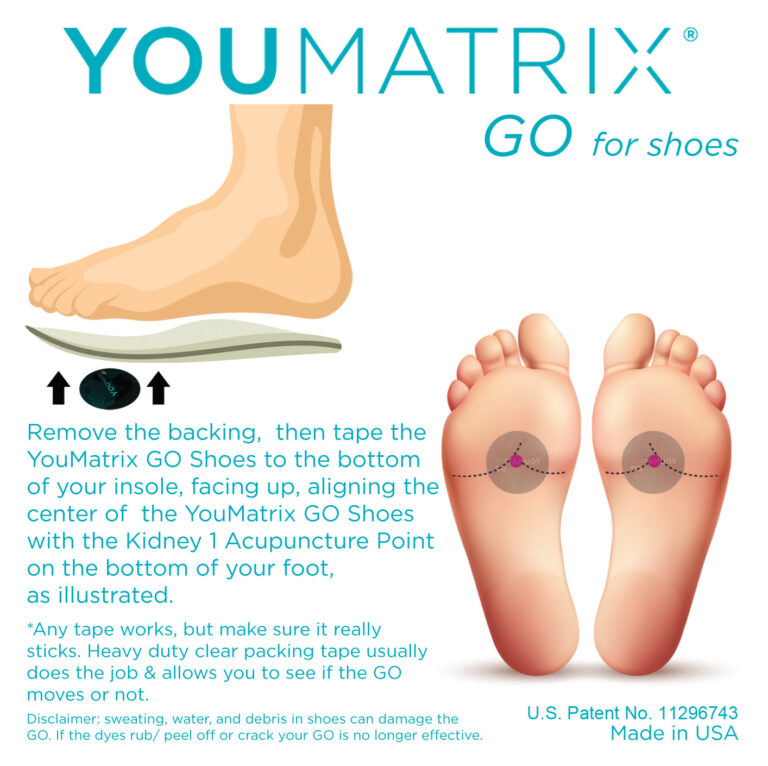
How does YouMatrix GO for Shoes protect me from artificial Electromagnetic Frequencies (EMFs)?
As with all the YouMatrix products, there is a microcrystalline structure built into each disc that is activated by artificial EMFs to allow your biology access to the natural frequencies in your environment that are necessary for self-regeneration to be possible. By stepping on the GO discs in your shoes you are activating the microcrystalline matrix via the piezoelectric effect. The GO discs are strategically placed under the Kidney 1 acupuncture point at the bottom of each foot to fortify your Kidney meridian, which manages the water systems of your body. Artificial EMFs corrupt water, which, in turn creates miscommunication and chaos in our biology. Thus, if you can strengthen your water systems at the place where the pollution enters your body (i.e. the Kidney 1 point) with the GO discs at that point, you have an increased chance of defending yourself against this corruption. Even more with the GO for Shoes, you now have the opportunity to transform the EMF pollution into the information your biology needs in order to be self-restorative.
Can I transfer YouMatrix GO for Shoes from one pair of shoes to another?
Yes. In order to do so you must place the GO discs at the Kidney 1 acupuncture point on a pair of insoles or orthotics that you can transfer between shoes. You can consult the directions as to how to install them properly.
What is the piezoelectric effect and why is it important for YouMatrix GO for Shoes?
The piezoelectric effect is the ability of certain materials to generate an electric charge in response to applied mechanical stress. In the case of the GO discs in your shoes, you are applying a mechanical stress on the microcrystalline structure in the discs by stepping on them.
If I wear sandals, can I use YouMatrix GO for Shoes?
Yes, but most likely you will not be able to transfer them to other shoes or sandals.
You want to make sure that you protect the GO discs from coming into direct contact with your feet, dirt, sand, and other abrasive or oily substances to prevent damage to the GO.
We suggest that you use a strong tape directly over the entire surface of the GO discs when secured in place on your sandals to prevent damage.
How do I protect YouMatrix GO for Shoes from being damaged?
Prevent your GO discs from coming into direct contact with oil, dirt, sand, or abrasive materials. Make sure to have a barrier between your foot and the GO discs. By following the installation directions of placing the GO discs on the underside of an insole or orthotic you can prevent direct contact. If this is not possible, make sure to cover the entire surface of the GO disc with a non-abrasive tape, like a heavy duty, transparent packing tape.
What can I expect to feel when wearing the YouMatrix GO for Shoes?
Most people have reported feeling more energetic and productive. Some people have reported less foot and knee pain, especially if walking or standing on hard surfaces. Others have noticed that they are able to focus better and have less brain fog. You may not feel anything, but this does not mean the GO for Shoes are not working for you.
How Many Discs are used for YouMatrix Go?
The YouMatrix GO package includes 2 Discs with 1 disc to be placed under the forefoot of each foot.
Water Restructuring Device
YouMatrix H2O
Discover how YouMatrix H2O transforms your water’s energy signature, making hydration more aligned with your body’s biofield for deeper, cellular-level support.
Local spring water (which may also need to be filtered) is ideal. If you cannot access a clean source of spring water you must have water that has natural minerals in it. Reverse osmosis water no longer contains minerals that can be structured.
If your YouMatrix H2O gets dirty or stained use a damp cloth or sponge, with or without a mild soap, to clean it. Avoid abrasive cleaners, scrubbers, bleach, and other harsh chemicals. It is best to use a dry towel to dry your YouMatrix H2O after cleaning it. Streaks, stains, and minor scrapes in your YouMatrix H2O do not effect its performance.
Although the YouMatrix H2O is resilient, it is best to put a towel or plate between it and a hot beverage. Do not let your YouMatrix H2O stand in water as it can cause delamination. Minor scrapes do not effect the performance of your YouMatrix H2O, however do not place abrasive containers upon it or use abrasive cleaners to wash it.
Streaks, stains, buckling, folds, creases, and minor scrapes in your YouMatrix H2O do not effect its performance. Gouges, cuts, burns, and major scratches that go through the layers that compromise the ink and lenses of your YouMatrix H2O can effect its performance. It is best to keep your YouMatrix H2O out of direct sunlight for prolonged periods of time as the UV rays can diminish its effectiveness by fading the inks.
It takes at least 20 minutes to restructure 1 liter of water on the YouMatrix H2O, however ideally the water should be on it for 48 hours. The 48 hour period is based on something called the Chronobiology clock that indicates what information is “downloaded” and stored in water during a specific time of the day. Ideally we want to capture and utilize all of this information that is imprinted from 4am-4am (sun time) in 1 Chronobiological day cycle, and we can do so by drinking water that has been sitting on a YouMatrix H2O during this time. This information can properly guide our biology to restructuring the water throughout our internal systems.
Why 48 hours then if 1 Chronobiological day cycle is 24 hours? Because most people are not going to fill a container right at 4am sun time and wait to drink it until the next day at 4am. By filling a container and leaving it on the YouMatrix H2O and never letting it go dry, you can continuously enjoy structured water.
Please refer to the third party test done on the YouMatrix H2O’s predecessor, the Quantys Drink, for further insights regarding the benefits of water structured on this device (https://youmatrixit.
We suggest you get a 2-3 gallon container and fill it with spring water and never let it run dry. Since there are 3.785 liters/ gallon if your container is 2 gallons it will initially take approximately 2 1/2 hours for the full container to be structured. If, however, you add water every time you draw from it your water will continue to be structured. Thus if you draw a liter of water to drink, then replace that liter.
The YouMatrix H2O package contains one large disc to be placed at base of your pitcher. Instructions on placement are included with package.
Anytime you heat water, especially if you use electricity to do so, it will change the structure of the water molecules. When you boil water it agitates the water molecules and this creates a degradation of the structure.
If you do not have a second YouMatrix H2O to place it on for at least 5 minutes, create a platform that sits atop your water container that sits on your YouMatrix H2O, and place it on there.
Colloids are minerals found in water and in all the fluids of your body. Their job is to receive and transfer information to and from every cell in your body. They have to be oriented with the natural frequencies in our environment so they can “pick up” and transmit these frequencies necessary for self-regeneration. Every 20 minutes the colloids go through a shape change and we have to be in sync with that shift in orientation otherwise we miss out on critical information and we go further off course. Artificial EMFs disorient the colloids, thus interrupting your biology’s ability to communicate information throughout the body.
Generally the structure holds 4 hours before it starts to degrade and takes about 60 days to be fully destructured, however it does depend on the amount of EM pollution it is exposed to. This is why we never leave home without a YouMatrix H2O so that we can structure water, food, and all beverages on the go.
Yes, the volume of water in your container does matter. The YouMatrix H2O can structure up to a liter of water every 20 minutes. Why 20 minutes? Because every 20 minutes the colloids (minerals in a fluid suspension) in your body and environment are supposed to go through a shift in their orientation in accordance with the cycles of nature. The water you ingest needs to be synchronized with these shifts in order for your body to receive and transmit the proper information throughout your systems in an efficient manner. Thus the water you drink must be on the YouMatrix H2O for at least 20 minutes.
We suggest you get a 2-3 gallon container and fill it with spring water and never let it run dry. Since there are 3.785 liters/ gallon if your container is 2 gallons it will initially take approximately 2 1/2 hours for the full container to be structured. If, however, you add water every time you draw from it your water will always be structured. Thus if you draw a liter of water to drink, then replace that liter.
Note, one YouMatrix H2O will not restructure an entire swimming pool however.
The YouMatrix H2O will help make reverse osmosis (RO) water more biocompatible, but there is nothing in RO water to structure and thus it is dead water. Ideally you want to have the minerals that “come” with the water from its natural source (hence our suggestion to drink spring water), but if RO water is your only option then we suggest adding The Original Quinton or raw sea salt to give the water the minerals it requires in order to have something to structure. Please note, using the Hypertonic Quinton or raw sea salt is like using a supplement, thus we cannot give you a “prescription” for how much you need in your water, as it can vary from person to person, but a general rule of thumb is to use your sense of taste…like salting your food. Some days you may need more than others depending upon the cycles of nature. Use your best judgment or consult your healthcare practitioner for more individualized guidelines.

What do I do if I have more than 1 monitor attached to my computer or laptop?
Ideally you would install 5 YouMatrix TECH discs on the back of each monitor to address the EMF pollution. As we know this can be cost prohibitive we suggest some harmonization is better than none, and anything you can do to reduce your EMF burden can help reduce the overall stress on your body. So install the TECH discs as outlined for each device in the instructions.
How long does YouMatrix TECH last?
The manufacturer’s guarantee is 12 months and thus it is recommended you replace your YouMatrix TECH every year to have optimal harmonization of the artificial frequencies associated with desktop computers, laptops, and tablets.
Can I transfer YouMatrix TECH discs to a different computer, laptop, or tablet?
Yes. If you think you may want to transfer your YouMatrix TECH discs to a different device within 12 months of 1st installing them (12 months because it is recommended to replace your TECH every 12 months for optimal harmonization), we suggest that instead of removing the backing from the TECH discs that you use a doubled over piece of tape on the backing and apply the YouMatrix TECH discs as discussed in the installation instructions. It is very important to then place a cover over your laptop or tablet otherwise they can come off easily and be lost. If you do not have a cover, you may want to apply tape directly over the TECH discs to prevent damage and loss. In the case of desktops, do not remove the backing and tape over them to secure them in place on your computer.
How do I apply YouMatrix TECH discs to my laptop, tablet, and computer?
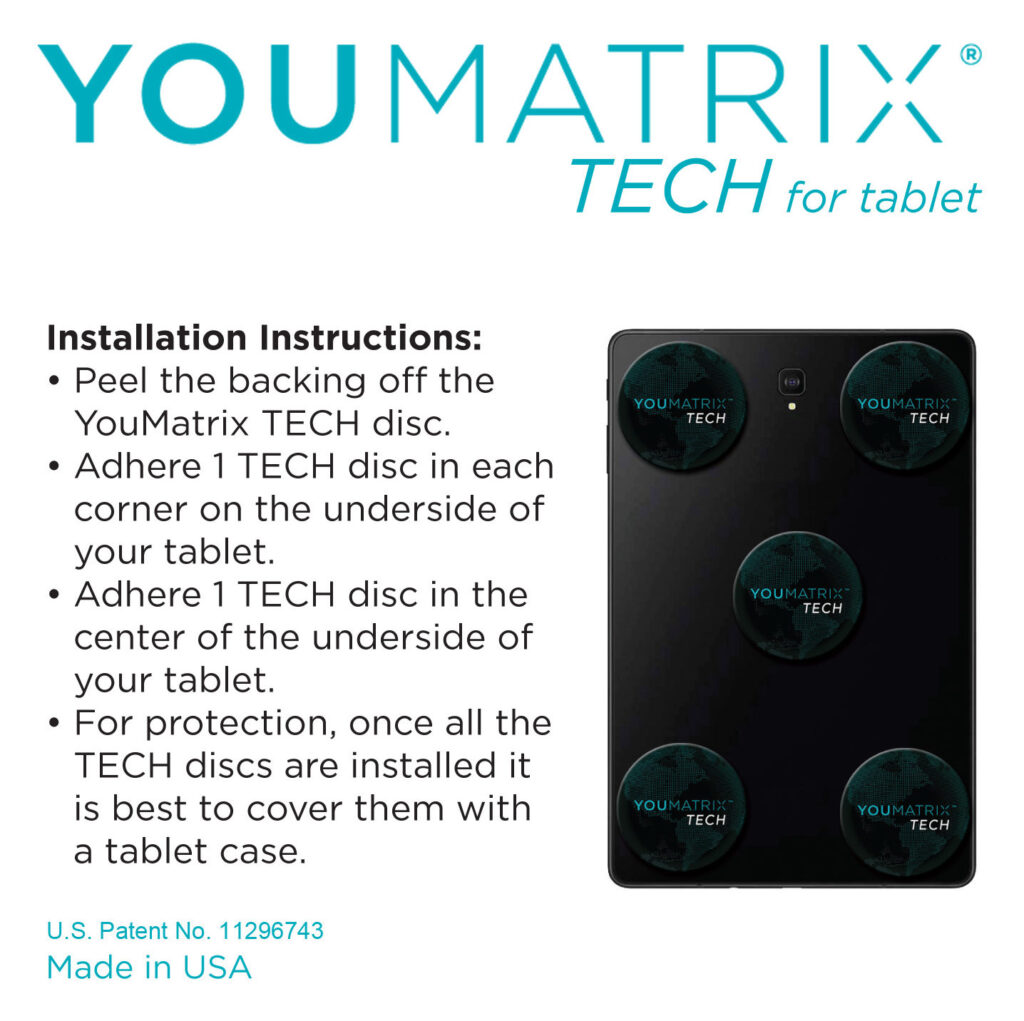
Laptops require 6 YouMatrix TECH discs, tablets require 5, all-in-one desktops require 10 TECH discs, and all other desktop computers (i.e. tower, mini, and cube versions) require 15 TECH discs.
To apply the TECH discs, remove the backing from the discs, adhere one to each corner of the underside of your laptop and/ or tablet, and one to the middle of the underside. Hold them in place for a moment for the best adhesion.
For laptops the 6th TECH disc goes on the center of the top of the lid. Be mindful not to place the discs directly over laptop feet or fully cover any vents on the underside.
It is a good idea to clean the back of your laptop or tablet so the TECH adhere better. The logo doesn’t have to be straight in order for it to be effective. It is merely for esthetic purposes to have it aligned.
If you do not have a laptop or tablet cover, you may want to apply tape directly over the TECH disks to prevent damage and loss.
For desktops the installation depends on which model of computer you have. Please refer to the Shop page to review the illustrations and directions on how to install the TECH discs on your particular model of desktop.
How does YouMatrix TECH work?
YouMatrix TECH discs use the artificial Electromagnetic Frequencies (EMFs) emitted from your laptop, tablet, or desktop computer as a catalyst to access the information your biology needs in order to be self-regenerating. The TECH discs have an imbedded microcrystalline structure that allows the artificial EMFs to be transformed into biocompatible frequencies that your biology can utilize.
Can YouMatrix TECH be used with any laptop, tablet, or computer?
Yes. Apply the TECH discs as indicated in the directions while being mindful to not fully cover any vents.
Is placement and # of discs used important?
Yes!
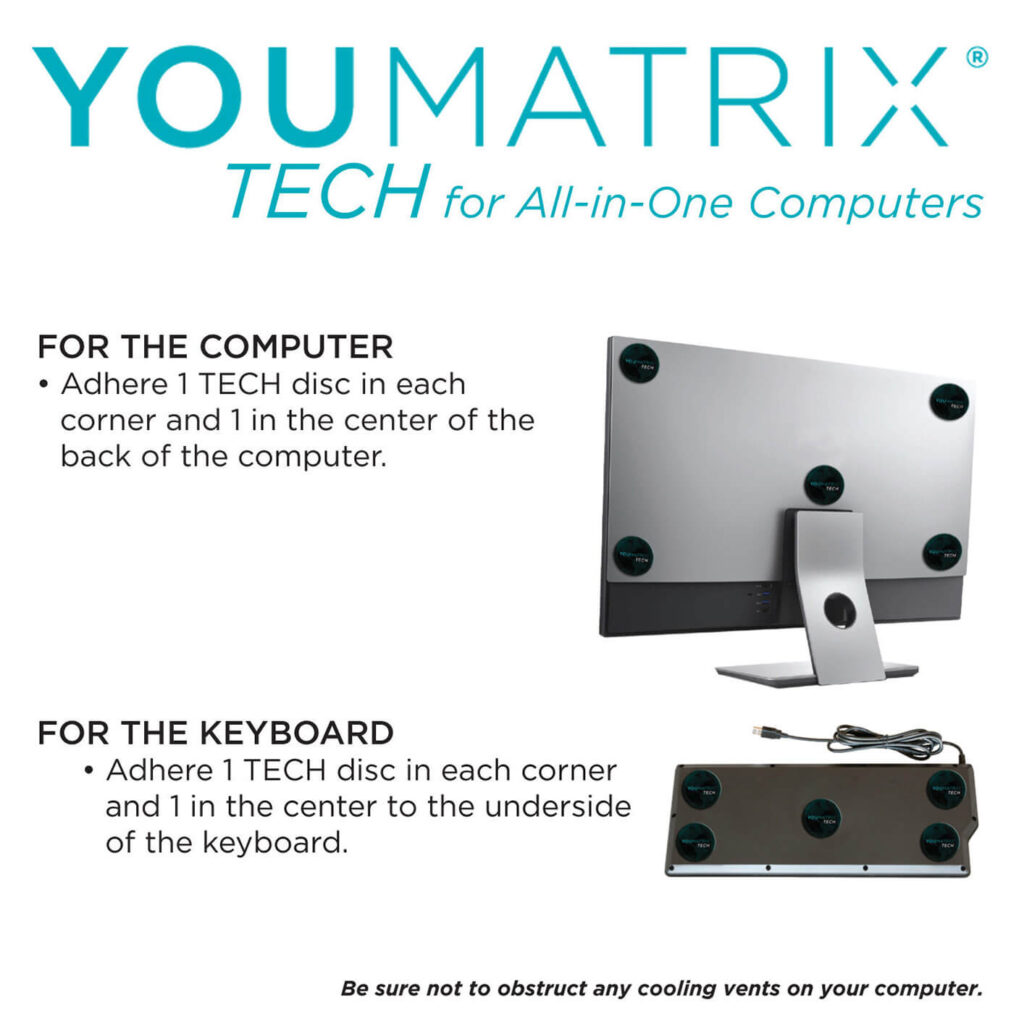
In the case of the YouMatrix TECH All-in-One Computer product, 10 TECH discs are required to properly harmonize the device, and each disc must be placed in a specific location in accordance with the illustrated instructions.
YouMatrix Tech
All-In-One
Explore the science and strategy behind our core technology, how it interacts with EMF emissions and why it’s designed to support your body’s natural rhythm.
any questions? ask us!!
For Laptops
YouMatrix Tech Laptop
Whether you are using your laptop for work, school, or play, find out how it can work with you, instead of against you.
The manufacturer of the dyes, used in creating the unique adapters, guarantee is 12 months. Thus we recommend you replace your YouMatrix TECH every year to have optimal harmonization of the artificial frequencies associated with computers, laptops, and tablets.
Yes. If you think you may want to transfer your YouMatrix TECH discs to a different device within 12 months of 1st installing them (12 months because it is recommended to replace your TECH every 12 months for optimal harmonization), we suggest that instead of removing the backing from the TECH discs that you use a doubled over piece of tape on the backing and apply the YouMatrix TECH discs as discussed in the installation instructions. It is very important to then place a cover over your laptop or tablet otherwise they can come off easily and be lost. If you do not have a cover, you may want to apply tape directly over the TECH discs to prevent damage and loss. In the case of desktops, do not remove the backing and tape over them to secure them in place on your computer.
Laptops require 6 YouMatrix TECH discs, tablets require 5, all-in-one desktops require 10 TECH discs, and all other desktop computers (i.e. tower, mini, and cube versions) require 15 TECH discs.
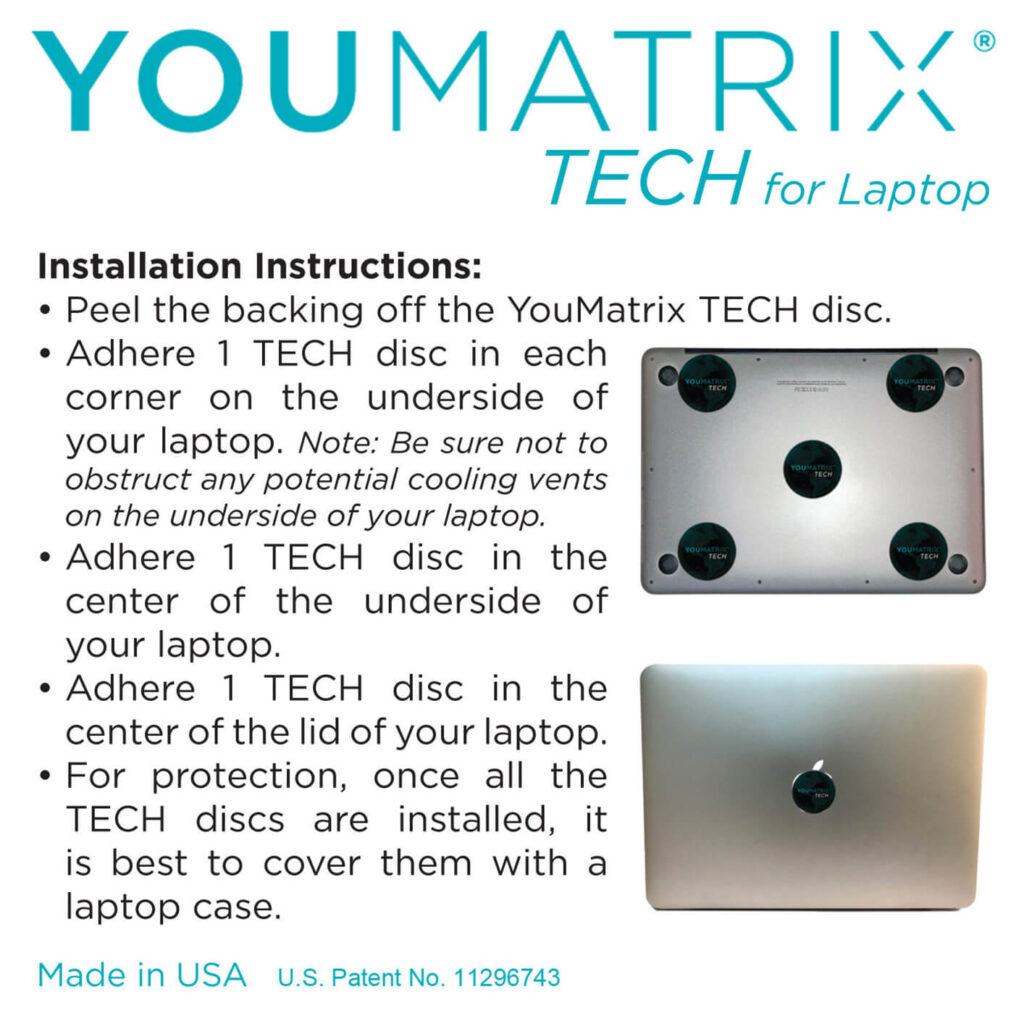
To apply the TECH discs, remove the backing from the discs, adhere one to each corner of the underside of your laptop and/ or tablet, and one to the middle of the underside. Hold them in place for a moment for the best adhesion.
For laptops the 6th TECH disc goes on the center of the top of the lid. Be mindful not to place the discs directly over laptop feet or fully cover any vents on the underside.
It is a good idea to clean the back of your laptop or tablet so the TECH adhere better. The logo doesn’t have to be straight in order for it to be effective. It is merely for esthetic purposes to have it aligned.
If you do not have a laptop or tablet cover, you may want to apply tape directly over the TECH disks to prevent damage and loss.
For desktops the installation depends on which model of computer you have. Please refer to the Shop page to review the illustrations and directions on how to install the TECH discs on your particular model of desktop.
Yes, the YouMatrix TECH discs have been designed to be thin enough to fit under any case and have the same protection power.
YouMatrix TECH discs use the artificial Electromagnetic Frequencies (EMFs) emitted from your laptop, tablet, or desktop computer as a catalyst to access the information your biology needs in order to be self-regenerating. The TECH discs have an imbedded microcrystalline structure that allows the artificial EMFs to be transformed into biocompatible frequencies that your biology can utilize.
Yes. Apply the TECH discs as indicated in the directions while being mindful to not fully cover any vents.
6 Discs are included in the YouMatrix TECH for Laptops package.
It is important to utilize all discs and ensure they are applied in the specific locations as specified in the included instructions.
For Tablets
YouMatrix TEch Tablet
Yes. Apply the TECH discs as indicated in the directions while being mindful to not fully cover any vents.
YouMatrix TECH discs use the artificial Electromagnetic Frequencies (EMFs) emitted from your laptop, tablet, or computer as a catalyst to access the information your biology needs in order to be self-regenerating. The TECH discs have an imbedded microcrystalline structure that allows the artificial EMFs to be transformed into biocompatible frequencies that your biology can utilize.
Yes, the YouMatrix TECH discs have been designed to be thin enough to fit under any case and have the same protection power.
Laptops require 6 YouMatrix TECH discs, tablets require 5, all-in-one desktops require 10 TECH discs, and all other desktop computers (i.e. tower, mini, and cube versions) require 15 TECH discs.
To apply the TECH discs, remove the backing from the discs, adhere one to each corner of the underside of your laptop and/ or tablet, and one to the middle of the underside. Hold them in place for a moment for the best adhesion.
For laptops the 6th TECH disc goes on the center of the top of the lid. Be mindful not to place the discs directly over laptop feet or fully cover any vents on the underside.
It is a good idea to clean the back of your laptop or tablet so the TECH adhere better. The logo doesn’t have to be straight in order for it to be effective. It is merely for esthetic purposes to have it aligned.
If you do not have a laptop or tablet cover, you may want to apply tape directly over the TECH disks to prevent damage and loss.
For desktops the installation depends on which model of computer you have. Please refer to the Shop page to review the illustrations and directions on how to install the TECH discs on your particular model of desktop.
Yes. If you think you may want to transfer your YouMatrix TECH discs to a different device within 12 months of 1st installing them (12 months because it is recommended to replace your TECH every 12 months for optimal harmonization), we suggest that instead of removing the backing from the TECH discs that you use a doubled over piece of tape on the backing and apply the YouMatrix TECH discs as discussed in the installation instructions. It is very important to then place a cover over your laptop or tablet otherwise they can come off easily and be lost. If you do not have a cover, you may want to apply tape directly over the TECH disks to prevent damage and loss. In the case of desktops, do not remove the backing and tape over them to secure them in place on your computer.
The manufacturer’s guarantee is 12 months and thus it is recommended you replace your YouMatrix TECH every year to have optimal harmonization of the artificial frequencies associated with desktop computers, laptops, and tablets.
5 Discs are included in the YouMatrix TECH Tablets package.
It is important to utilize all discs and ensure they are applied in the specific locations as specified in the included instructions.
Desktop Computers
YouMatrix TECH Desktop
Understand how our desktop solution addresses high-frequency EMF emissions from large computer setups, ideal for anyone working long hours in tech-heavy spaces.
What do I do if I have more than 1 monitor attached to my computer or laptop?
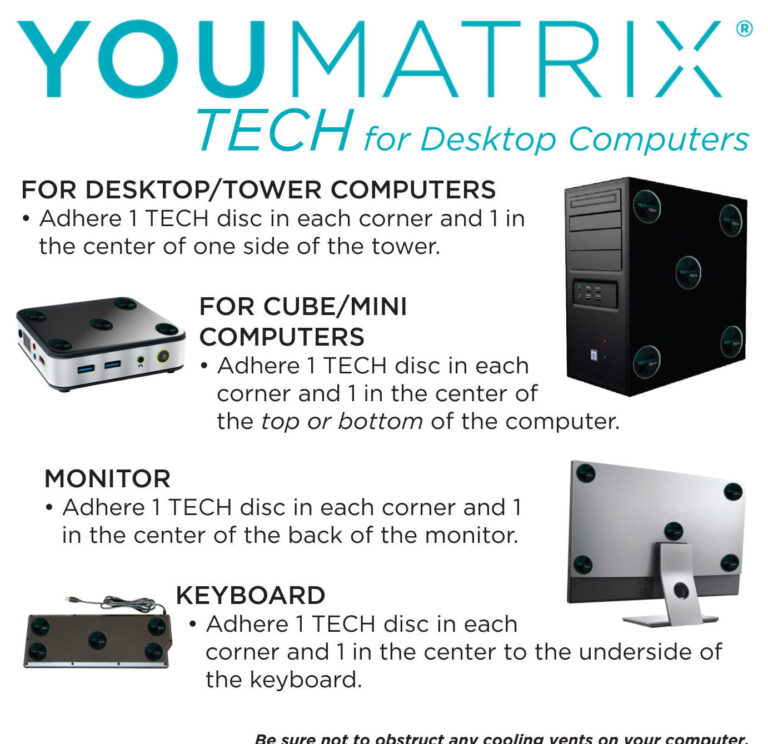
Ideally you would install 5 YouMatrix TECH discs on the back of each monitor to address the EMF pollution. As we know this can be cost prohibitive we suggest some harmonization is better than none, and anything you can do to reduce your EMF burden can help reduce the overall stress on your body. So install the TECH discs as outlined for each device in the instructions.
Can YouMatrix TECH be used with any laptop, tablet, or desktop computer?
Yes. Apply the TECH discs as indicated in the directions while being mindful to not fully cover any vents.
How does YouMatrix TECH work?
YouMatrix TECH discs use the artificial Electromagnetic Frequencies (EMFs) emitted from your laptop, tablet, or desktop computer as a catalyst to access the information your biology needs in order to be self-regenerating. The TECH discs have an imbedded microcrystalline structure that allows the artificial EMFs to be transformed into biocompatible frequencies that your biology can utilize.
How do I apply YouMatrix TECH discs to my laptop, tablet, and desktop computer?
Laptops require 6 YouMatrix TECH discs, tablets require 5, all-in-one desktops require 10 TECH discs, and all other desktop computers (i.e. tower, mini, and cube versions) require 15 TECH discs.
To apply the TECH discs, remove the backing from the discs, adhere one to each corner of the underside of your laptop and/ or tablet, and one to the middle of the underside. Hold them in place for a moment for the best adhesion.
For laptops the 6th TECH disc goes on the center of the top of the lid. Be mindful not to place the discs directly over laptop feet or fully cover any vents on the underside.
It is a good idea to clean the back of your laptop or tablet so the TECH adhere better. The logo doesn’t have to be straight in order for it to be effective. It is merely for esthetic purposes to have it aligned.
If you do not have a laptop or tablet cover, you may want to apply tape directly over the TECH disks to prevent damage and loss.
For desktops the installation depends on which model of computer you have. Please refer to the Shop page to review the illustrations and directions on how to install the TECH discs on your particular model of desktop.
Can I transfer YouMatrix TECH discs to a different desktop computer, laptop, or tablet?
Yes. If you think you may want to transfer your YouMatrix TECH discs to a different device within 12 months of 1st installing them (12 months because it is recommended to replace your TECH every 12 months for optimal harmonization), we suggest that instead of removing the backing from the TECH discs that you use a doubled over piece of tape on the backing and apply the YouMatrix TECH discs as discussed in the installation instructions. It is very important to then place a cover over your laptop or tablet otherwise they can come off easily and be lost. If you do not have a cover, you may want to apply tape directly over the TECH disks to prevent damage and loss. In the case of desktops, do not remove the backing and tape over them to secure them in place on your computer.
How long does YouMatrix TECH last?
The manufacturer’s guarantee is 12 months and thus it is recommended you replace your YouMatrix TECH every year to have optimal harmonization of the artificial frequencies associated with desktop computers, laptops, and tablets.
How many TECH discs are used for desktop computers?
The YouMatrix TECH Desktop Computer set has 15 discs.
The installation depends on which model of computer you have. Please refer to the illustrations and directions on how to install the TECH discs on your particular model of desktop.
General Questions
Technology & Warranty
Yes, we guarantee all YouMatrix products for 12 months. This is the period in which the manufacturer of the pigments used in the printing of the YouMatrix products, guarantees the integrity of the dyes for. This does not mean the YouMatrix product “shuts off” on day 366 of use, but it is advised to replace your YouMatrix products yearly to be under warranty. Please go to Product Warranty for more details.
The lenticular process is a unique printing process which integrates layers of small lenses with natural oil-based ink layers.
This was an important advancement for the YouMatrix technology because the small lenses act as tiny prisms that aid in amplifying the natural frequencies augmented by the patented process of YouMatrix, thus increasing its effectiveness without having to increase the number or thickness of the YouMatrix products.
A biocompatible frequency is a frequency which does not alter or disrupt in any way the biological functions. On the contrary it benefits it.
In the case of the YouMatrix products, we are taking unnatural frequencies that cannot be recognized by any biological system, and transforming them into a known format so that they can be utilized by biological systems as intended by nature.
RF meters are designed to detect man-made frequencies not the subtle frequencies of nature.
YouMatrix technology does not block, absorb, or redirect the man-made frequencies, but instead allows the body to receive the frequencies from nature, thus making the man-made EMR biocompatible. In fact, if you try to block, redirect, or absorb man-made frequencies emitted from your device, it will step up its power to find the best signal, thus producing even more destructive EMR emissions. YouMatrix technology, on the other hand, preserves the initial information contained in the EMR so the device functions properly while providing protection from harmful EMR.
To learn more listen to this Podcast interview
Yes, however at this time the YouMatrix ESPACE product is still handmade in small batches and requires some customization, thus it is unavailable for online purchases. This is a custom order product that requires additional education and evaluation to install. To find out more about special order products please contact us at info@youmatrixit.com directly and we will be sure to email you back asap.
Although all the YouMatrix products are based on the same fundamental principles, they are device or job specific. Since different sources of EMF pollution have different characteristics as to how they disturb your biology, there has to be a product designed to address that particular stressor. Meaning the YouMatrix 5G harmonizes cellphone radiation, and can be used on any cellphone, on any network, with any case. The YouMatrix TECH harmonizes the EMFs of any tablet, laptop, or computer. Please see the placement of the TECH discs for each kind of device. The YouMatrix GO Shoes harmonize ambient EMFs in your environment when worn and can be placed in any shoe, sandal or slipper, however depending upon the material your footwear is made of, it may be difficult to keep the GO discs in the proper place.
Yes, however at this time the YouMatrix WIFI product is still handmade in small batches and requires some customization, thus it is unavailable for online purchases. This is a custom order product that requires additional education and evaluation to install. To find out more about special order products please contact us at info@youmatrixit.com directly and we will be sure to email you back asap.
Simply put, it is more information pushed into the same space. 5G really just means 5th generation and it is not referring to the amount of gigabytes the network is trying to process at one time. As our biology gets exposed to more and more artificial information (EMFs/ EMR) the further and further it gets distracted and off track from being able to receive the natural information in our environment that allows us to be self-healing.
All the YouMatrix products are designed to use the Electromagnetic pollution of the device that is being harmonized as the catalyst to allow your biology access to the subtle, natural EMFs necessary for self-healing. Meaning these tools are literally using the pollution to your advantage by transforming it into usable energy. But how?…
All the YouMatrix products use the same principles, but let’s use the YouMatrix 5G for simplicity sake to explain how these products work. Within the YouMatrix 5G lies a dynamic, microcrystalline matrix that when applied to your phone, uses the artificial EMFs emitted from your cellphone itself to restore the missing Spin Mechanism; unlocking the access to the synchronized biocompatible frequencies necessary for self-healing. These biocompatible frequencies allow our body’s water molecules to function competently and do their job of transporting proper information throughout the body and hydrate your tissues. The YouMatrix 5G does not block, redirect, or absorb artificial frequencies, nor do they force a particular information on your body to achieve a specific outcome. Instead the YouMatrix 5G allows your biology to choose the information compatible with you.
All of the YouMatrix products are developed with the same basic principles in mind:
- Our biology requires access to the subtle frequencies in our environment in order to be self-healing.
- Natural Electromagnetic Frequencies (EMFs) are multi-dimensional, spinning frequencies. The Spin Mechanism is the master mechanism that is a synchronized and coordinated rotation that allows all systems in the Universe to coexist. It is important to understand that in the water molecule this is the mechanism that coordinates the rotation of the hydrogen atoms (98% of the Universe by volume) in relation to the Oxygen atom, in accordance with the natural EMF ambiance. Water being the essence of life, the Spin being the only “language” that our biology can understand and use to pilot itself thus the vital mechanism of life.
- We require these natural EMFs in a specific ratio in accordance with the time and place in which we are. This synchronicity is critical for the biology to function optimally.
- You cannot force an information on your body even if it is within the biological spectrum, without the risk of negative consequences.
- Water and the colloids (minerals) contained in it, are the conduit of all information, however it must have a particular structure that is organized by and is in sync with the natural EMFs in order to “receive and transmit” the vital biological information necessary for self-regeneration.
To the extent that you purchase any goods directly from us we may refund your purchase price within thirty (30) days of you notifying us in writing of your desire of the refund together with a reason for the request subject to the return of the Product to us in substantially the same condition as when purchased. Any refund or return may be subject to restocking fees as found on our Website.
If you did not purchase your YouMatrix product directly from the website or YouMatrix, please check with your certified YouMatrix reseller or affiliate for their return and refund policy.
Please see the YouMatrix Product Warranty page for more details. https://youmatrixit.com/about/product-warranty/
Since we choose to speak about our products and not about others, we have created a short document titled FAQ: What Does YouMatrix Think About This? that can help you evaluate products for yourself and determine what is a good fit for you.
Yes, it is safe to use the YouMatrix products with other products, but their effectiveness may be altered if used with technology that claims to block, shield, diffuse, reduce, or eliminate EMFs. When you block EMFs (successfully that is) you not only eliminate the artificial ones, this also cuts you off from the frequencies your biology needs in order to regenerate itself. Since we choose to speak about our products and not about others, we have created a short document titled FAQ: What Does YouMatrix Think About This? that can help you evaluate products for yourself and determine what is a good fit for you.
Yes! It is vital to the performance of your YouMatrix product that you use the correct number of discs and place them according to the supplied instructions for your specific device.
If you have questions on placement or disc usage, please contact us for further clarification.