
YouMatrix TECH Laptop

$150.00

YouMatrix TECH Laptop utilizes the artificial frequencies from your laptop to allow your biology access to the vital frequencies necessary for self-regeneration.

Set of 6 TECH discs to harmonize the artificial frequencies from laptops.

Description

How It Works

Laptops create Electromagnetic (EM) pollution that inhibits our body’s ability to access the information it needs to be self-healing. When you apply the YouMatrix TECH to your laptop it acts as a portal to help restore your biology’s access to the vital information present in nature that allows for self regeneration to be possible.

Patented Technology

YouMatrix TECH converts artificial Electromagnetic Radiation (EMR), or microwaves, emitted from your laptop into beneficial, biocompatible frequencies by adding the missing frequencies, which are present in nature. These natural frequencies dictate our ability to adapt, allowing us to adjust to the stressors all around us. U.S. Patent No. 11296743 & MADE IN USA

Instructions

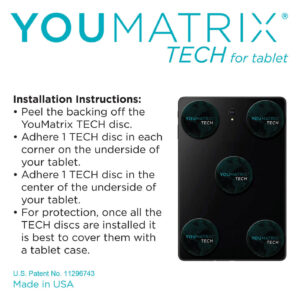
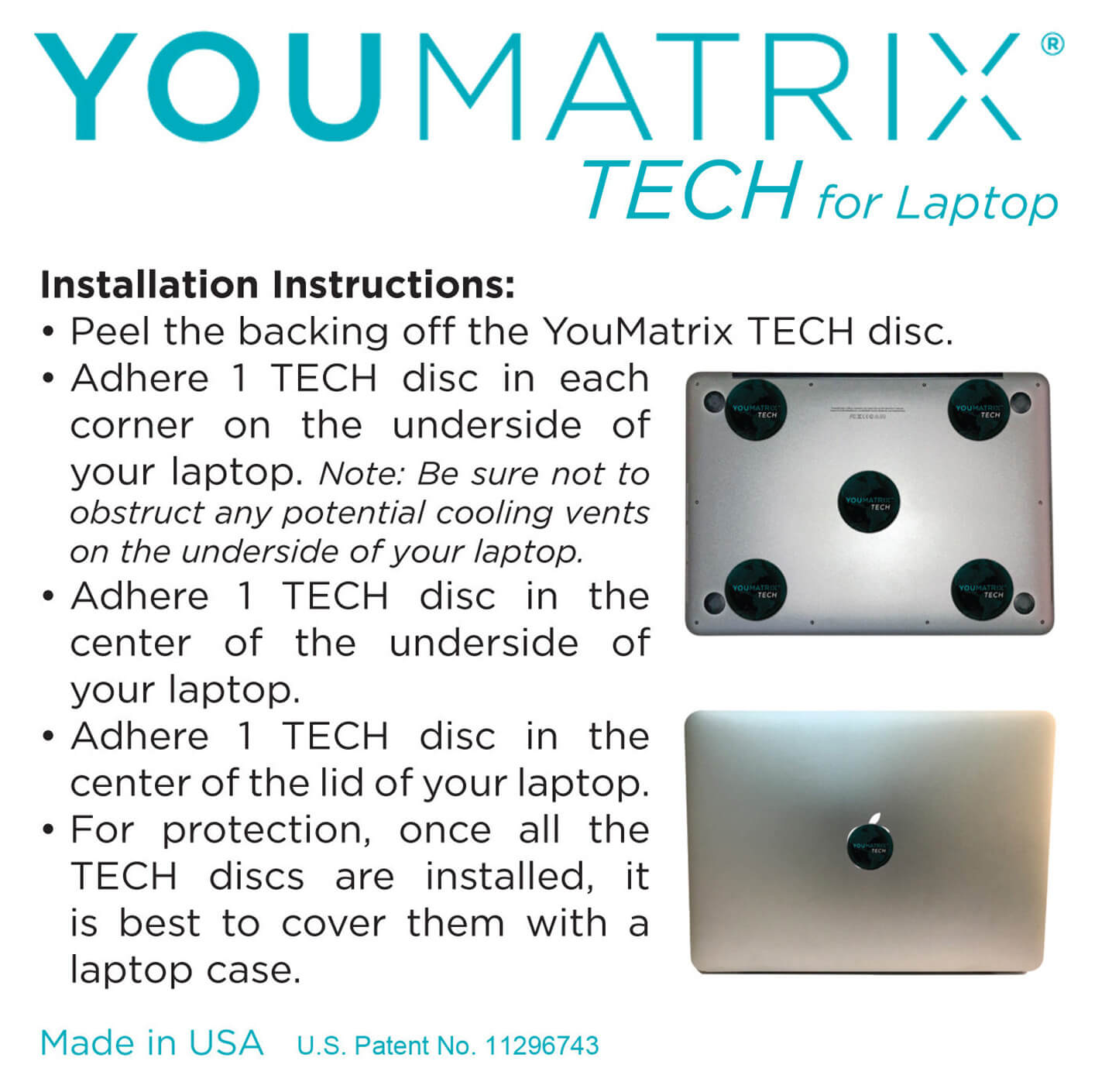
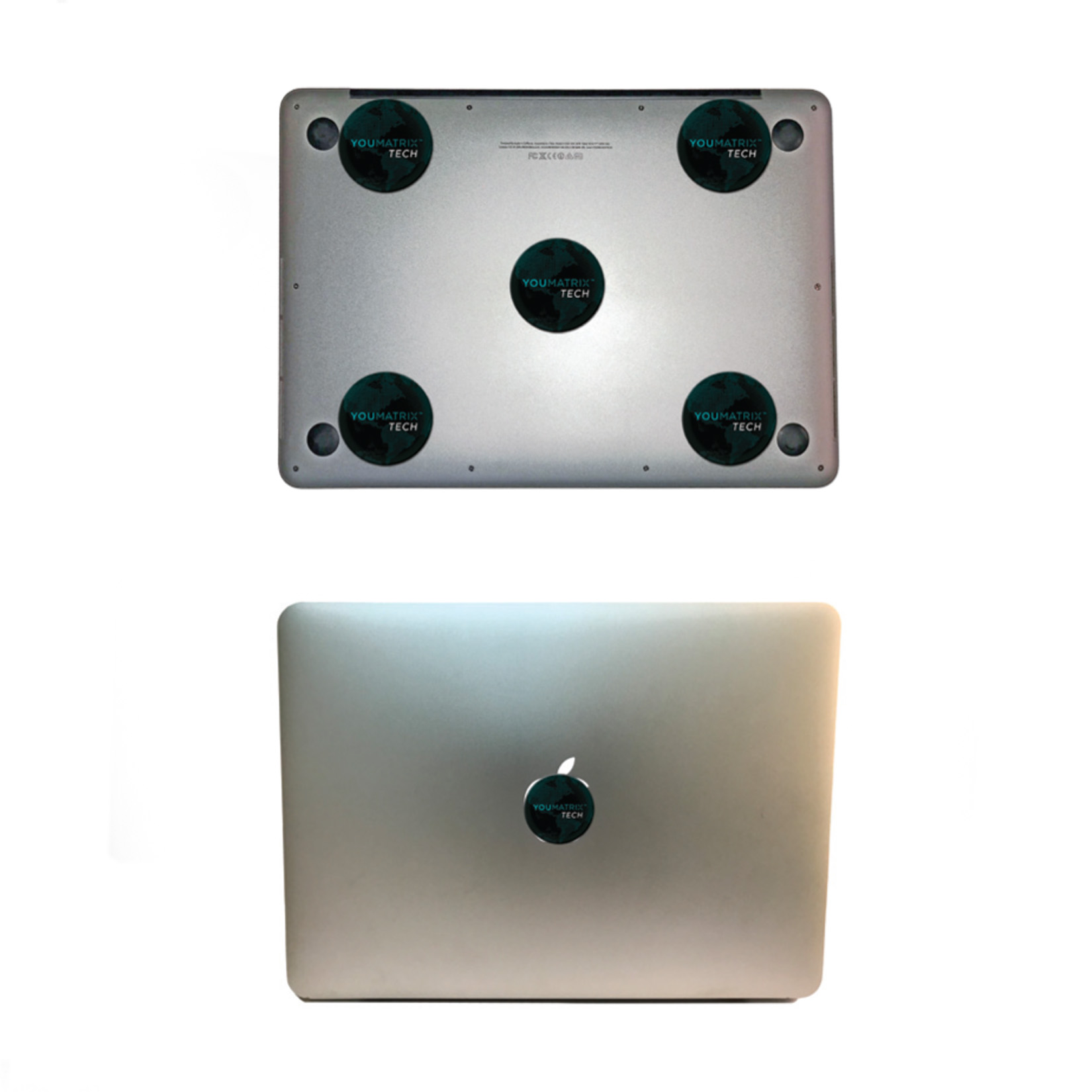
Peel the backing off the YouMatrix TECH disc. Adhere 1 TECH disc in each corner on the underside of your laptop. Note: Be sure not to obstruct any potential cooling vents on the underside of your laptop. Adhere 1 TECH disc in the center of the underside of your laptop. Adhere 1 TECH disc in the center of the lid of your laptop.

Tips

Even though the YouMatrix TECH is resilient to scratching and fading, you can better protect it with a case over it. If you think you may need to remove your YouMatrix TECH for any reason before 12 months have passed (i.e. getting a new device, repairing your device) it is advised to NOT permanently adhere it to your device. Instead tape your TECH in the appropriate location on your device and secure it in place with a case. This way you can easily remove the TECH without damaging either your device or your YouMatrix TECH. For the best performance it is recommended to replace your YouMatrix TECH once/ year. More tips can be found in the FAQs at YouMatrixIt.com

Warranty

YouMatrix LLC warrants that the product will be free from defects in materials and workmanship for a period of 12 months from the purchase date. Warranty applies only to products purchased from YouMatrix LLC and/or its authorized affiliates. Warranty is void for purchase from nonauthorized third parties. WARRANTY DOES NOT APPLY TO REGULAR WEAR AND TEAR. For complete warranty terms and conditions, refer to www.YouMatrixIt.com.

Features

  • Compact design; slim paper substrate material
  • Adhesive backing for easy application
  • Laptop agnostic; works with any brand device
  • Case compatible; fits easily under case
  • Working 24/7; no on-off switches
  • No wires, attachments or apps to download

YouMatrix Tech FAQ's

Find answers about how our laptop-specific patch helps offset EMF exposure while maintaining the performance you rely on for work, school, or play.
Yes, the YouMatrix TECH discs have been designed to be thin enough to fit under any case and have the same protection power.
YouMatrix TECH discs use the artificial Electromagnetic Frequencies (EMFs) emitted from your laptop, tablet, or desktop computer as a catalyst to access the information your biology needs in order to be self-regenerating. The TECH discs have an imbedded microcrystalline structure that allows the artificial EMFs to be transformed into biocompatible frequencies that your biology can utilize.

Yes. Apply the TECH discs as indicated in the directions while being mindful to not fully cover any vents.

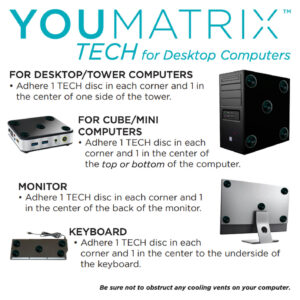
Ideally you would install 5 YouMatrix TECH discs on the back of each monitor to address the EMF pollution. As we know this can be cost prohibitive we suggest some harmonization is better than none, and anything you can do to reduce your EMF burden can help reduce the overall stress on your body. So install the TECH discs as outlined for each device in the instructions.
The manufacturer’s guarantee is 12 months and thus it is recommended you replace your YouMatrix TECH every year to have optimal harmonization of the artificial frequencies associated with desktop computers, laptops, and tablets.
Yes.  If you think you may want to transfer your YouMatrix TECH discs to a different device within 12 months of 1st installing them (12 months because it is recommended to replace your TECH every 12 months for optimal harmonization), we suggest that instead of removing the backing from the TECH discs that you use a doubled over piece of tape on the backing and apply the YouMatrix TECH discs as discussed in the installation instructions. It is very important to then place a cover over your laptop or tablet otherwise they can come off easily and be lost. If you do not have a cover, you may want to apply tape directly over the TECH disks to prevent damage and loss. In the case of desktops, do not remove the backing and tape over them to secure them in place on your computer.

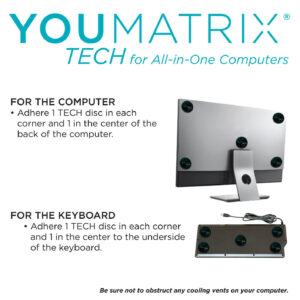
Laptops require 6 YouMatrix TECH discs, tablets require 5, all-in-one desktops require 10 TECH discs, and all other desktop computers (i.e. tower, mini, and cube versions) require 15 TECH discs.

To apply the TECH discs, remove the backing from the discs, adhere one to each corner of the underside of your laptop and/ or tablet, and one to the middle of the underside. Hold them in place for a moment for the best adhesion.

For laptops the 6th TECH disc goes on the center of the top of the lid. Be mindful not to place the discs directly over laptop feet or fully cover any vents on the underside.

It is a good idea to clean the back of your laptop or tablet so the TECH adhere better. The logo doesn’t have to be straight in order for it to be effective. It is merely for esthetic purposes to have it aligned.

If you do not have a laptop or tablet cover, you may want to apply tape directly over the TECH disks to prevent damage and loss.

For desktops the installation depends on which model of computer you have. Please refer to the Shop page to review the illustrations and directions on how to install the TECH discs on your particular model of desktop.

Reviews

There are no reviews yet.

Only logged in customers who have purchased this product may leave a review.

To View the YouMatrix Website, you must accept our terms and Conditions.

This site does not provide health or medical advice. You should consult a licensed physician for any specific outcome questions.